Drawing register & distribution

Every drawing.
Current. Everywhere.

Upload a revision — your list is emailed in one tap, the old one is marked superseded, and recognised callouts jump between sheets.

Get started See how it works
From $165 a month per project, inc GST · No hidden fees · Recipients never need an account
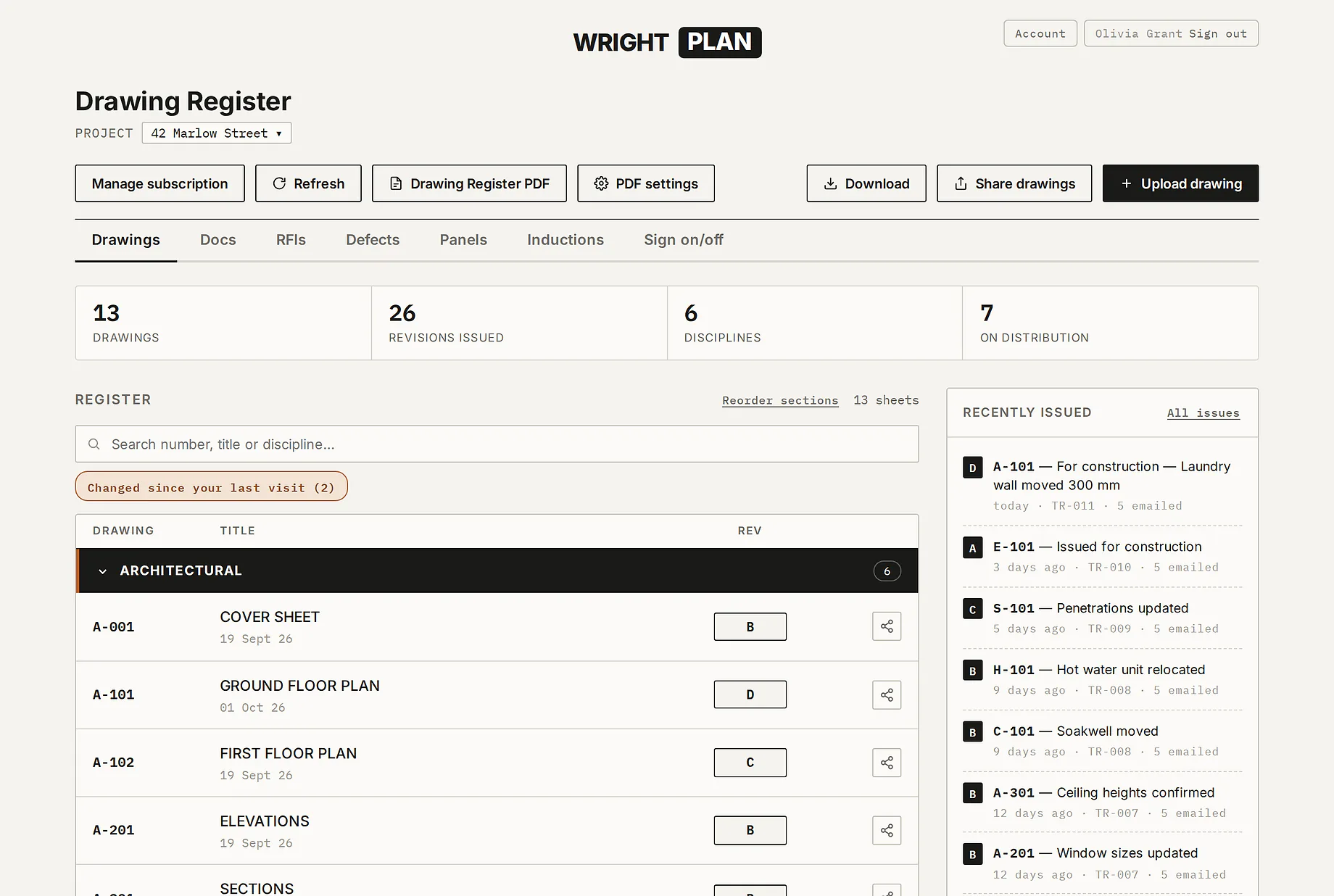
The Wright Plan drawing register for a job called 42 Marlow Street: 13 drawings, 26 revisions issued, 6 disciplines and 7 people on distribution, with the Architectural sheets listed under their heading at their current revision, and a Recently issued list showing each issue's transmittal number and how many people were emailed.

Real screens from the app. The job, the people and the companies in them are made up.

Drawings + Docs · $275 a month inc GST

From inbox to on-site
in four moves.

One register for every sheet on the job. Issue a revision and your list gets a link to the current one — it opens on any device, with no account and no attachments. A Docs folder keeps the job's other files for your team.

01 — UPLOAD

Drop the PDF. It reads itself.

The drawing number, title and revision are read from the title block and shown beside a preview — you check them and save. Drop a whole set and each sheet gets its own row.
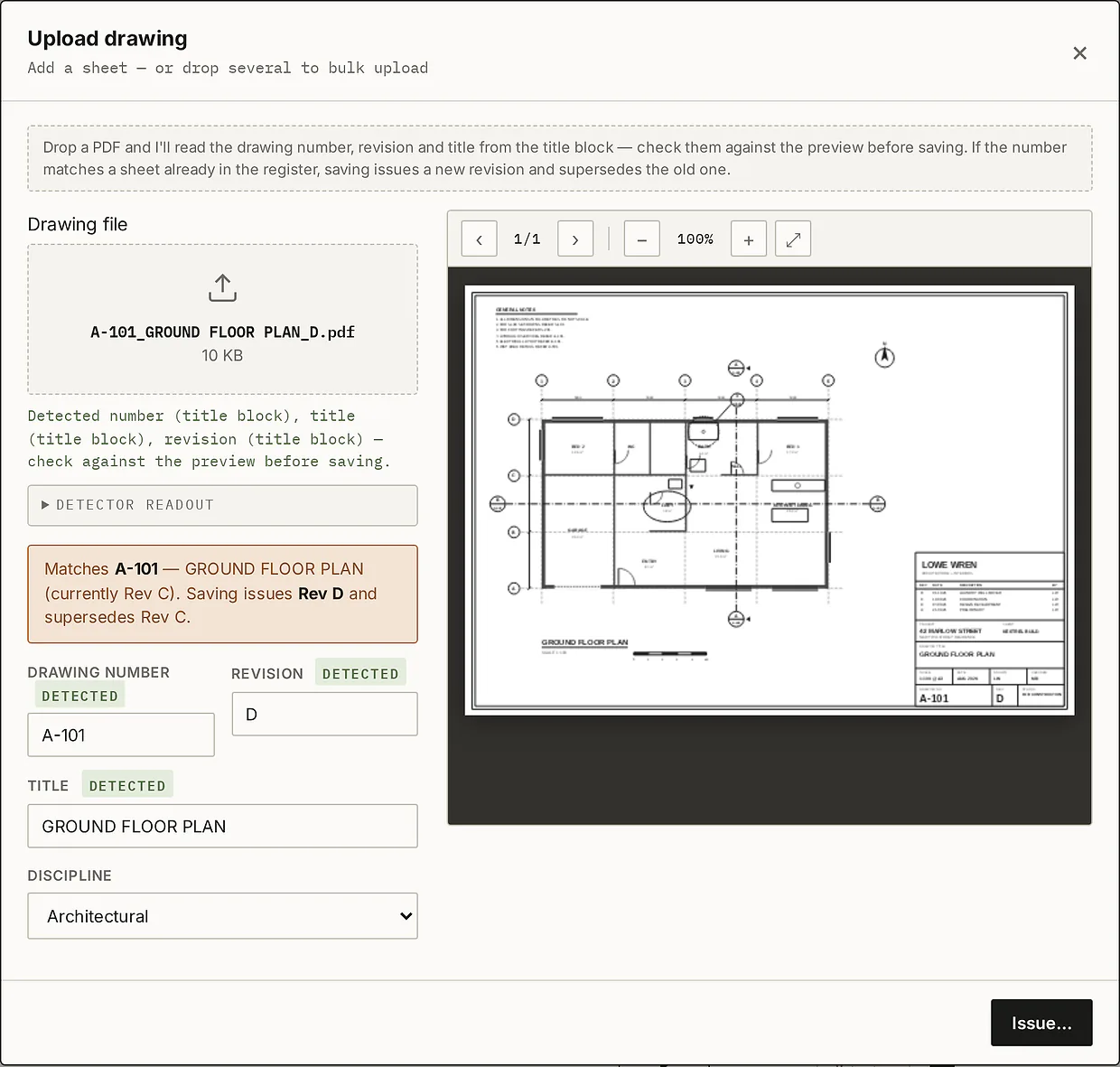
The Upload drawing dialog with A-101 GROUND FLOOR PLAN Rev D. Drawing number, revision and title each carry a green DETECTED label, a preview of the sheet sits beside them, and a note says it matches A-101, currently Rev C, so saving issues Rev D and supersedes Rev C.
02 — NOTIFY

One tap tells everyone.

Issue & email sends each person on your list the reason, your note, what it supersedes and a link to the sheet — only the drawings they're set to see. Replies come to you, and every issue gets a numbered transmittal.
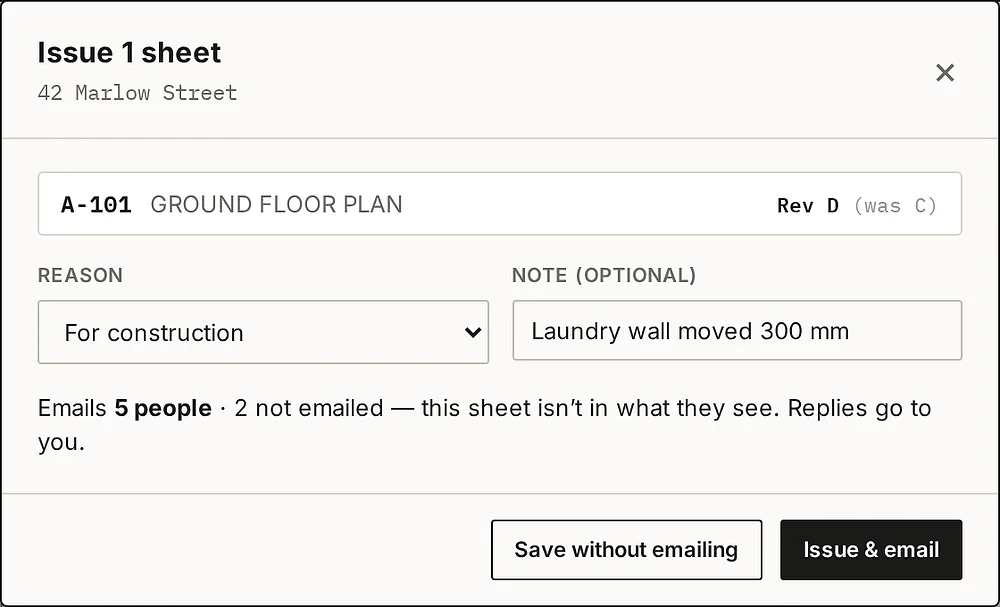
The Issue 1 sheet box: A-101 GROUND FLOOR PLAN, Rev D (was C), reason For construction, a note, and the line Emails 5 people, 2 not emailed because this sheet isn't in what they see, with Save without emailing and Issue & email buttons.
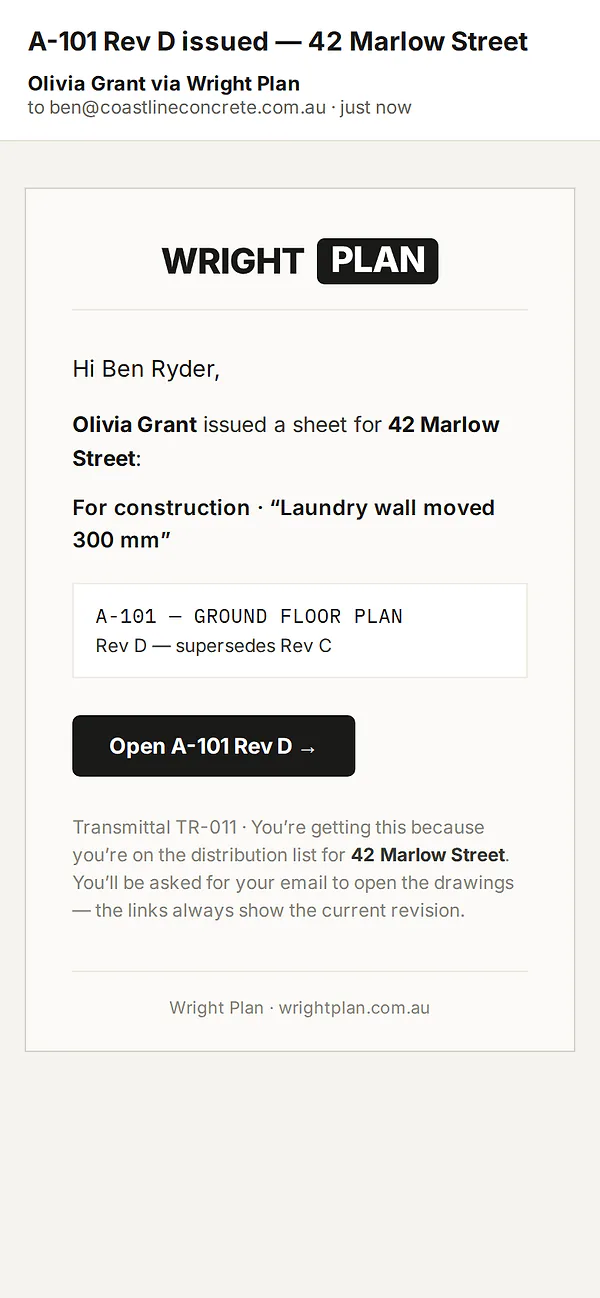
The email on a phone: A-101 Rev D issued — 42 Marlow Street, from Olivia Grant via Wright Plan. It names the reason and note, shows A-101 Rev D supersedes Rev C, has an Open A-101 Rev D button and the transmittal number TR-011.
03 — SUPERSEDE

Old revisions retire themselves.

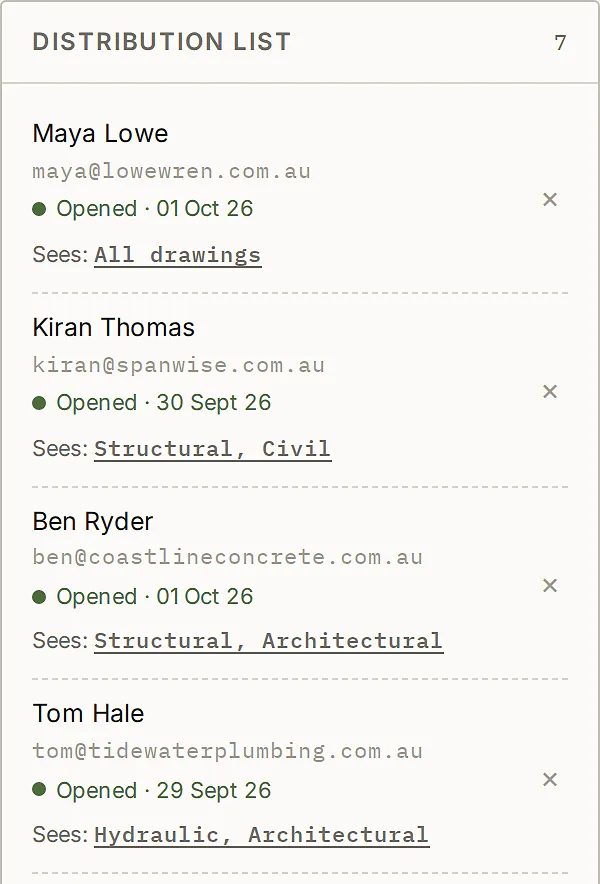
The new revision becomes current and the old one is marked superseded — kept in the history, and stamped SUPERSEDED if downloaded. Your list shows when each person last opened the drawings, and the register PDF counts the current revisions each has opened — by the email they entered.
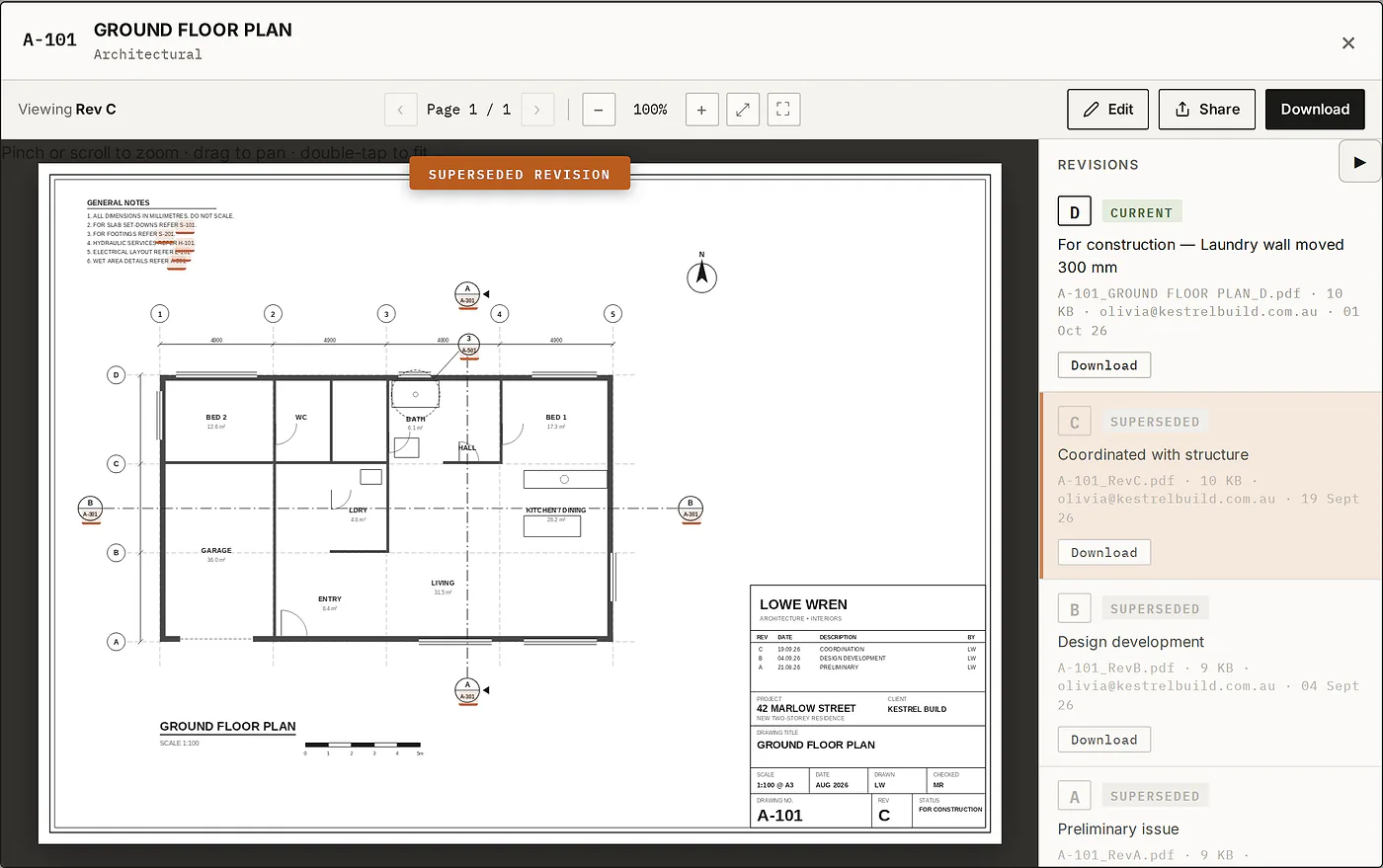
The drawing viewer on A-101 at Rev C, flagged Superseded revision. The Revisions panel lists D as Current and C, B and A as Superseded, each with its note, file and date.
The distribution list: Maya Lowe, Kiran Thomas, Ben Ryder and Tom Hale, each with the date they last opened the drawings and which disciplines they see.
04 — NAVIGATE

Callouts become links.

Sheet numbers on a drawing — section markers, detail callouts, “refer S-101” notes — become links when that sheet is in your register. Tap one to open it; the back button takes you straight back.
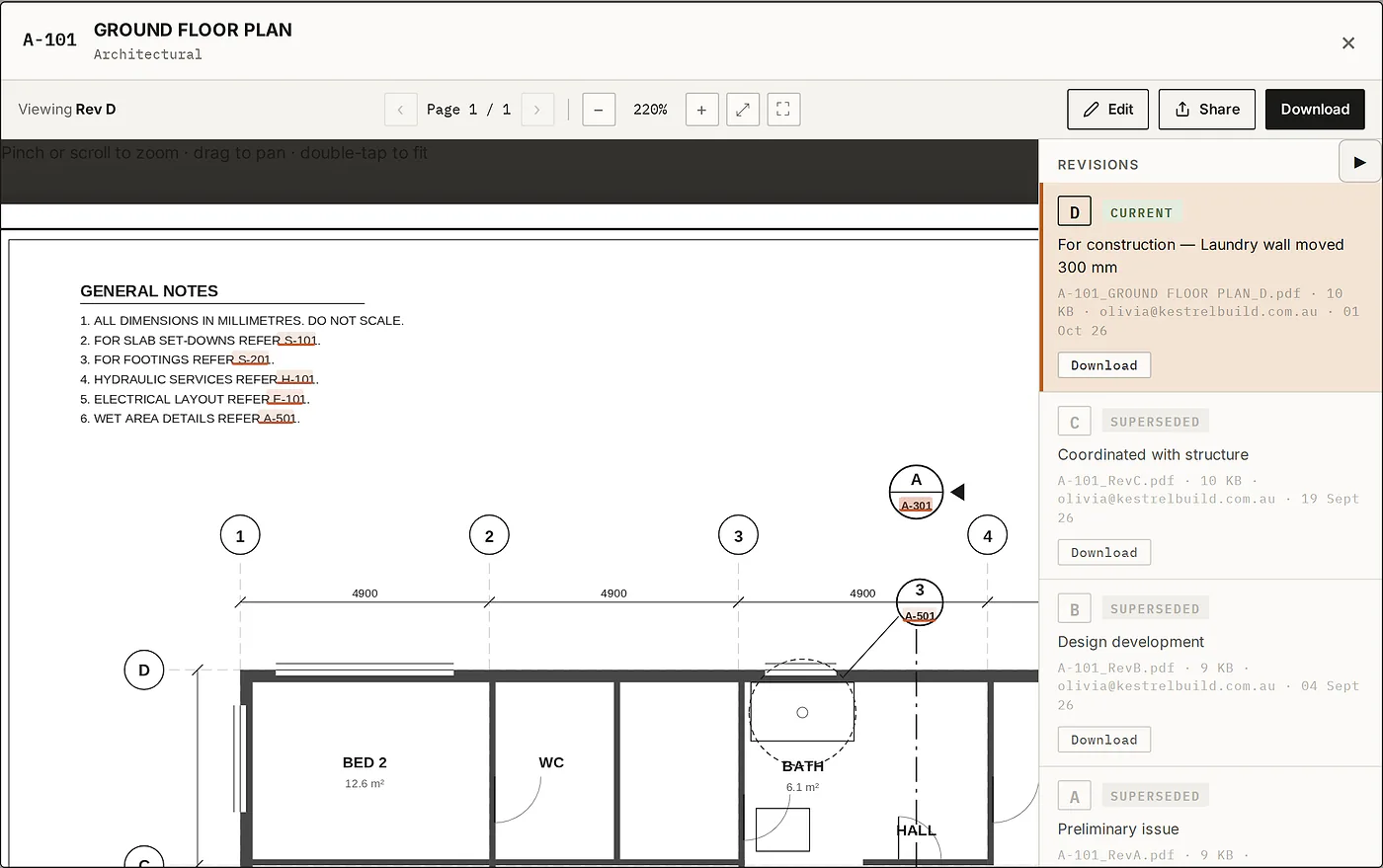
A-101 zoomed in the viewer. The general notes' references to S-101, S-201, H-101, E-101 and A-501, the section marker's A-301 and the detail callout's A-501 are each highlighted as links.
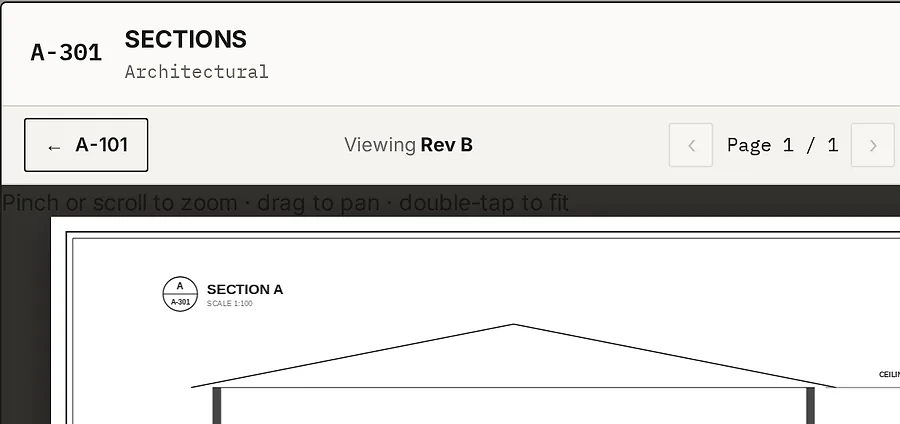
After tapping A-301: the viewer shows A-301 SECTIONS at Rev B, with a back button labelled A-101 at the left of the toolbar.
Built for site

The key points.

Opens, tracked

Who opened what and when, by the email they entered — and every emailed issue kept on a numbered transmittal.

Access-controlled links

“Distribution list only” links open for your list alone. Take someone off it and their address stops working — even on an “Anyone with the link” link, which lets in whoever has it (stop it in Sent links). Downloaded copies can’t be recalled.

Made for the phone

Pinch-zoom A1 sheets on a phone in the ute.

Team permissions

Colleagues issue drawings or stay view-only — you own the register.

Drawing Register PDF

Pick the disciplines and what goes in — revision history, distribution, who has opened the current revisions — and it's built from the live register.

Linked drawings

Recognised callouts jump to the sheet they reference.

RFI Tracker · $55 a month add-on, inc GST

Every question,
on the record.

RFIs kept in the same place your drawings live — a numbered register, site photos, the response when it comes back, and a PDF of each one to send with your usual email.

01 — RAISE

Numbered for you.

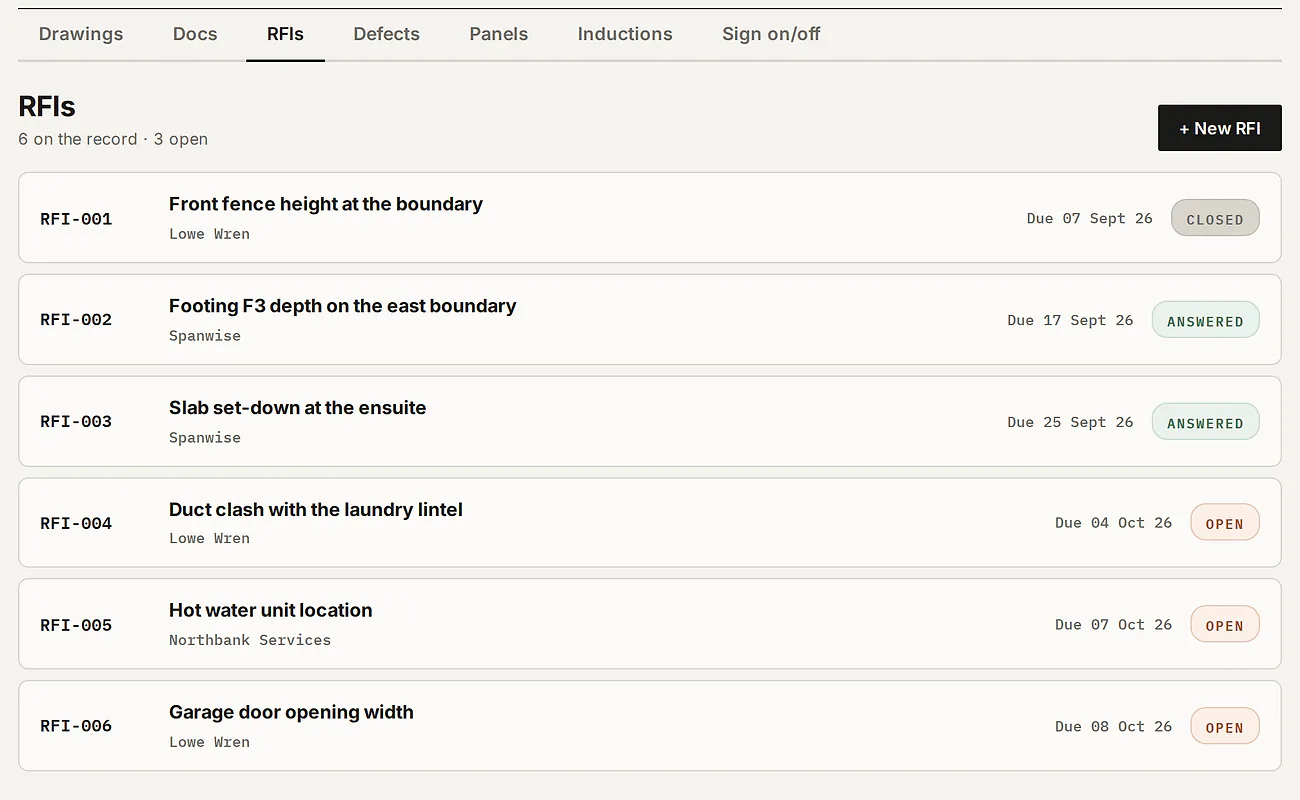
Each RFI takes the next number — RFI-001 onward — with who it's directed to, when the response is due, and its status: open, answered or closed.

The RFIs tab: six RFIs numbered RFI-001 to RFI-006, each with its title, who it is directed to, its due date and a status of closed, answered or open.
02 — RECORD

Photos in, answers kept.

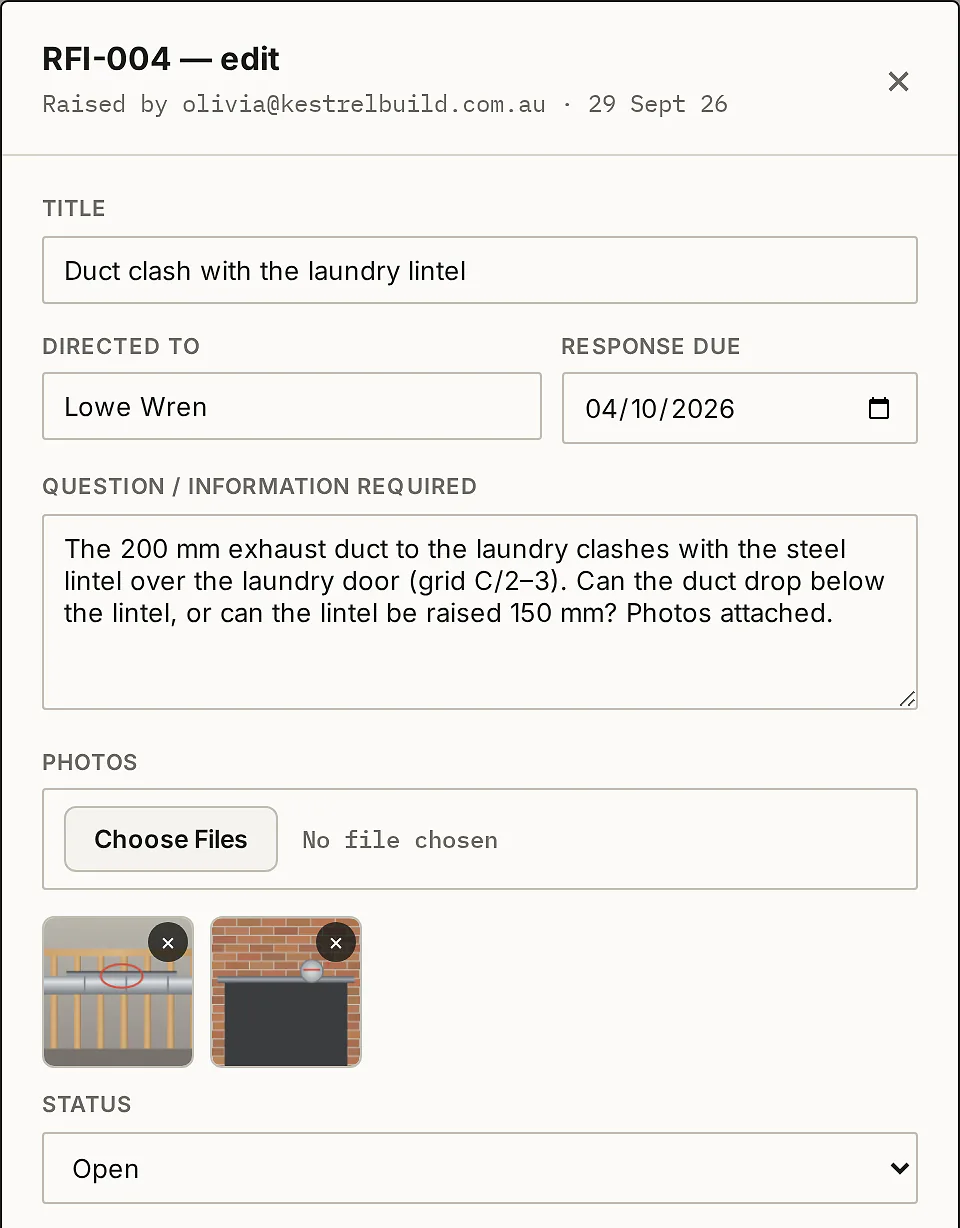
Attach site photos when you raise it. When the answer comes back, paste it in and keep the consultant's response files — PDFs or photos — on the same RFI.

RFI-004, Duct clash with the laundry lintel: directed to Lowe Wren, response due 04/10/2026, the question, and two site photos attached.
03 — EXPORT

One PDF per RFI.

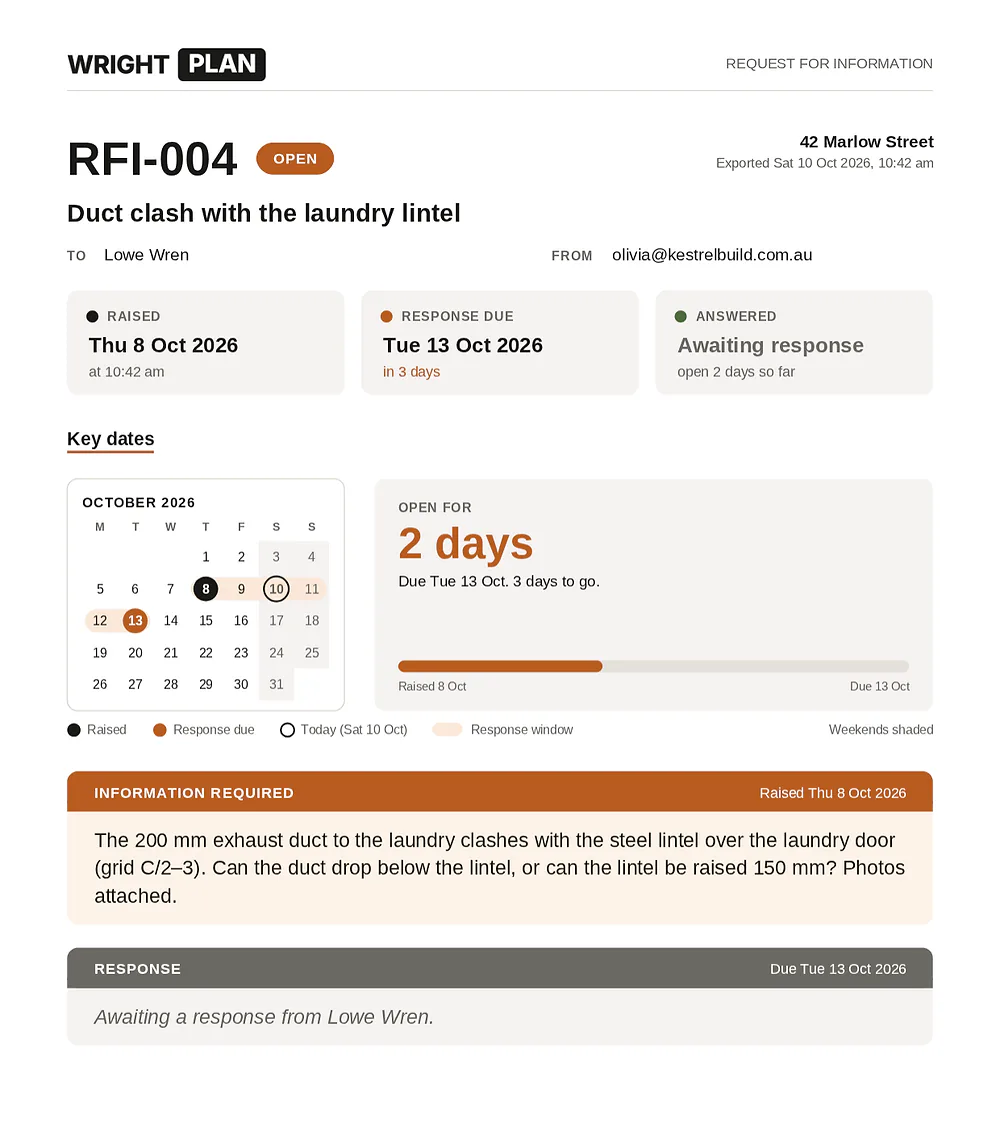
Export the RFI as one PDF — its status, the key dates on a calendar, the question, the answer and the photos — ready to send or file.

The exported RFI PDF: RFI-004, Duct clash with the laundry lintel, marked open — the dates it was raised and is due, a calendar of the key dates, open for 2 days, the information required and the response still awaited.
Defect Tracker · $55 a month add-on, inc GST

Pin it. Send it.
Sign it off.

Pin defects onto a copy of your plan, send each trade their own list, and approve each fix from their photo. The drawings in your register are never touched.

01 — PIN

Tap the plan. Drop a pin.

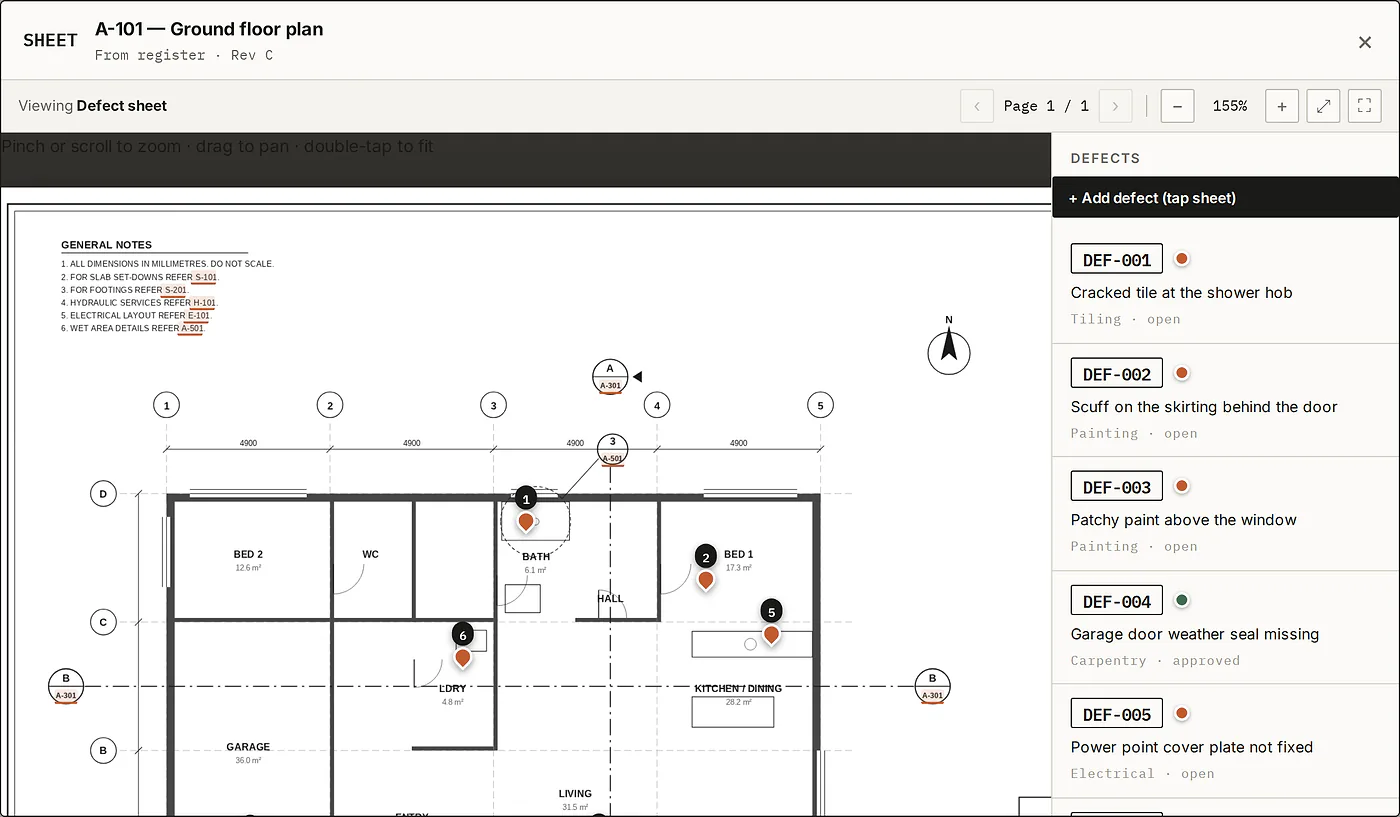
Copy a sheet from your register, or upload one, and tap where the problem is. Each defect is numbered DEF-001 onward and carries a trade, a location note and photos.

A defect sheet, a copy of A-101 Ground floor plan, with numbered pins in the bathroom, bedroom, kitchen and laundry, and a Defects panel listing DEF-001 to DEF-005 with their trades and statuses.
02 — SEND

Each trade gets their own list.

Send to trades emails each trade a link to just their defects — no account. On their phone they see each one on the plan and tick it off by adding a photo of the fix.

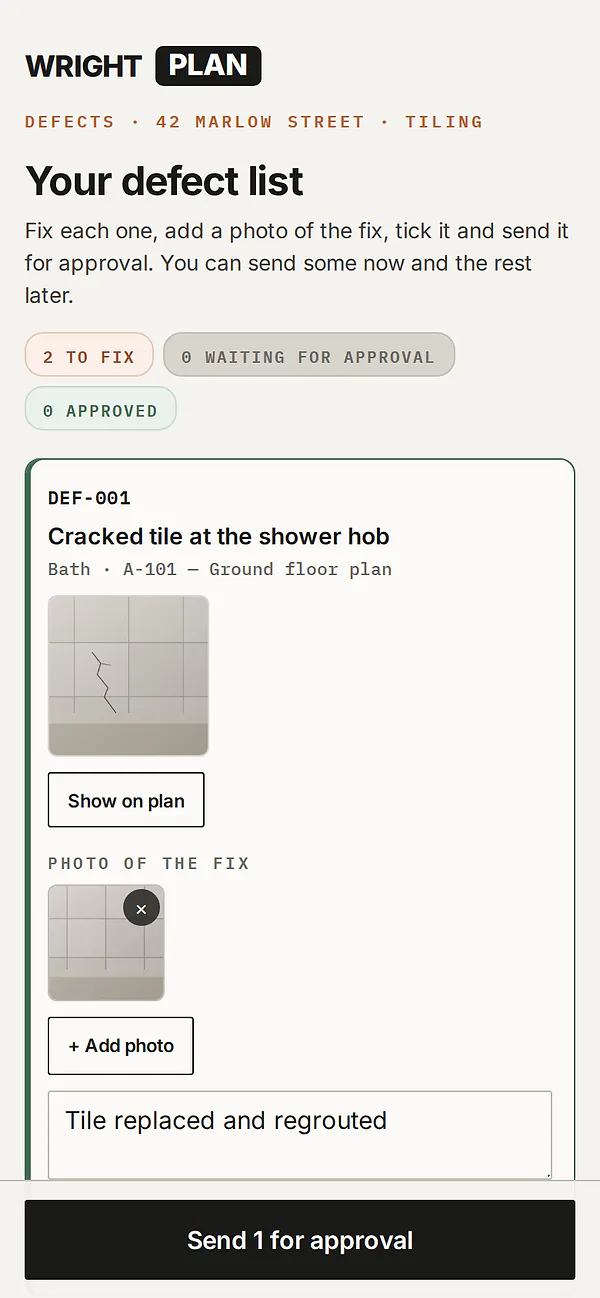
The tiler's defect list on a phone: 2 to fix. DEF-001, Cracked tile at the shower hob, with the builder's photo, a Show on plan button, a photo of the fix and the note Tile replaced and regrouted, and a Send 1 for approval button.
03 — APPROVE

Approve it, or send it back.

The fix comes back to you with the trade's photo and note. Approve it, or send it back with a note they'll see. Full and per-trade defect reports show each approved fix with its photos.

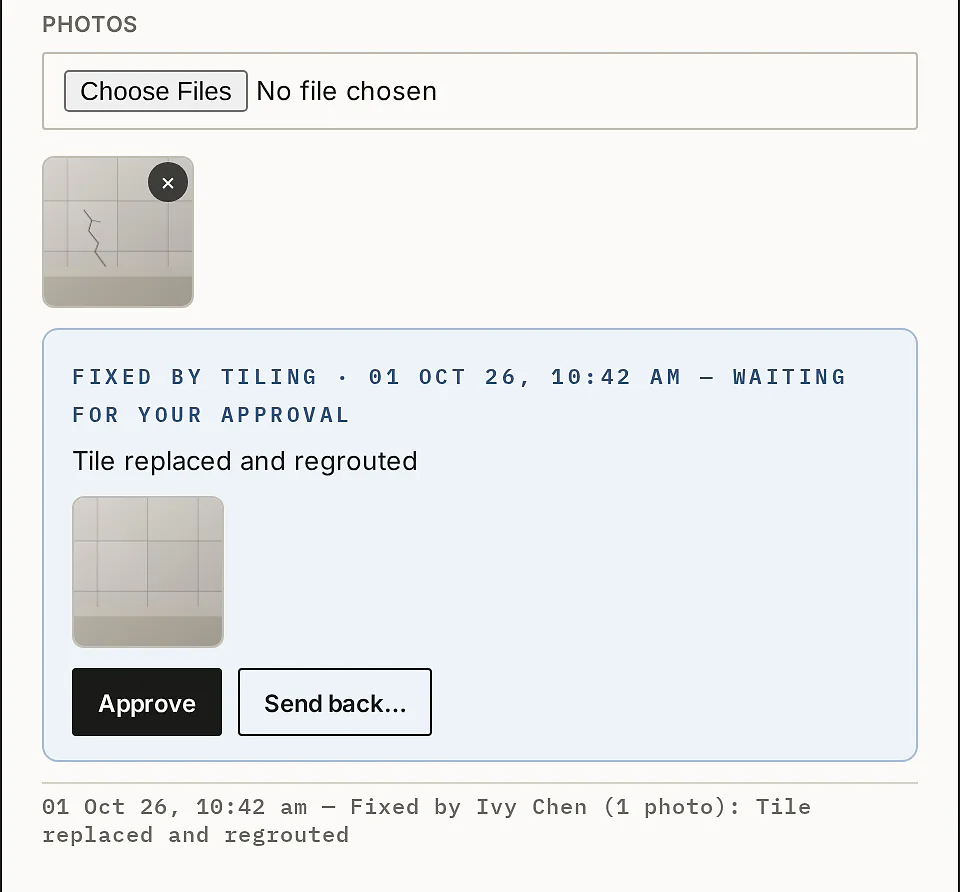
DEF-001 in the builder's app: the original photo of the cracked tile, then Fixed by Tiling, waiting for your approval, with the trade's note and photo, Approve and Send back buttons, and the history line Fixed by Ivy Chen.
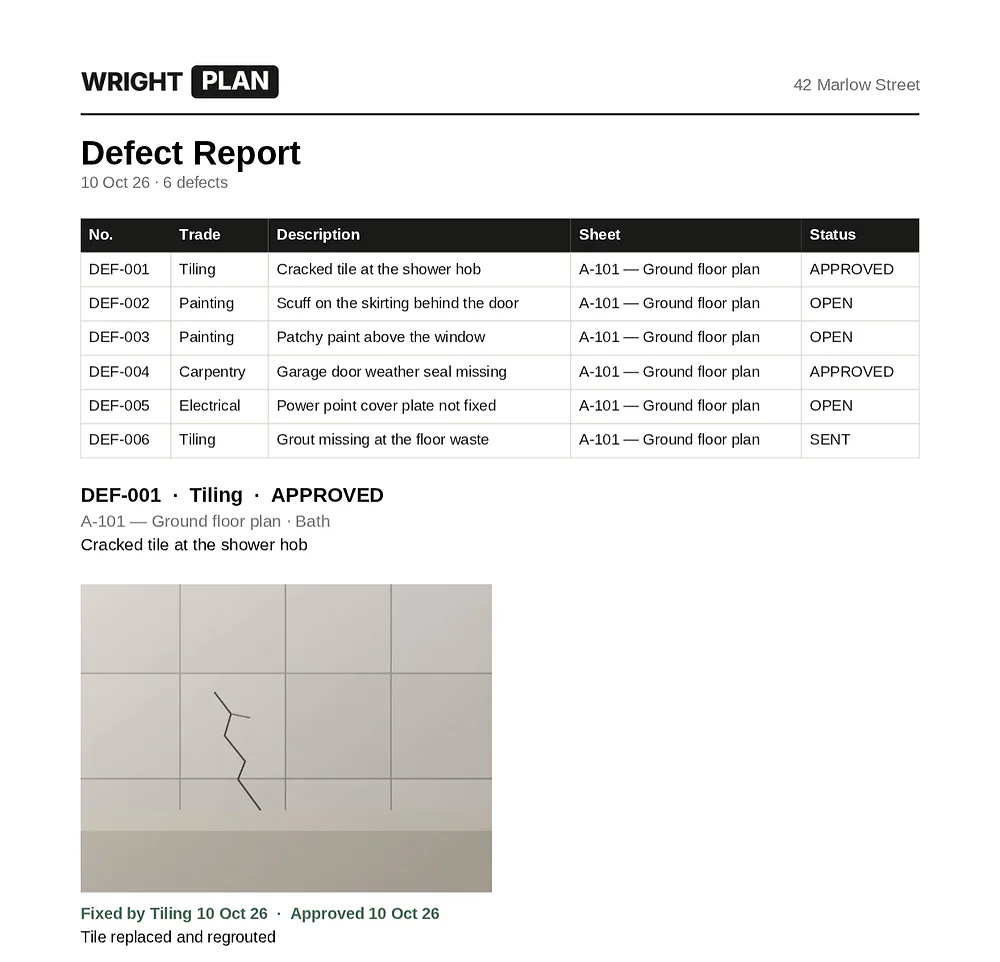
The defect report PDF: a table of six defects with trade, description, sheet and status, then DEF-001 approved, with the before photo and the fix photo.
Inductions + Sign on/off · $165 a month inc GST

Inducted at the gate.
Reviewed in one place.

A QR poster at the gate — workers induct themselves on their phone. White card photo mandatory, your documents must be opened and acknowledged, e-signature, then one-tap accept or decline with an email fix-it loop. $88 a month inc GST when added to Drawings + Docs.

01 — SCAN

Scan, fill in, sign.

Print the site QR poster, or send the same link before they arrive. The form asks for their details, a selfie, their white card and any tickets, and they read every required document to the end before they can sign.

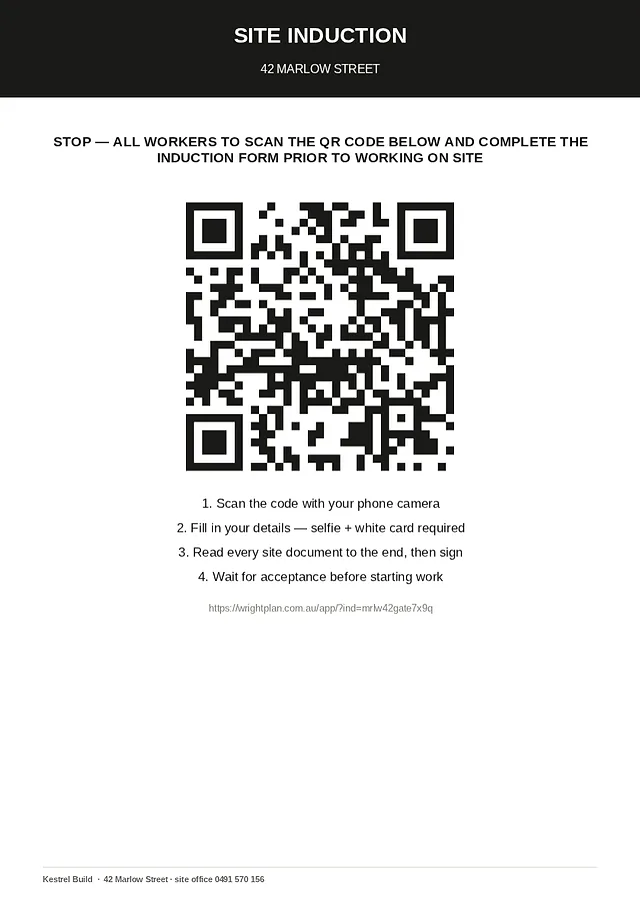
The site induction QR poster for 42 Marlow Street: a QR code and four steps — scan the code, fill in your details with a selfie and white card, read every site document then sign, and wait for acceptance before starting work.
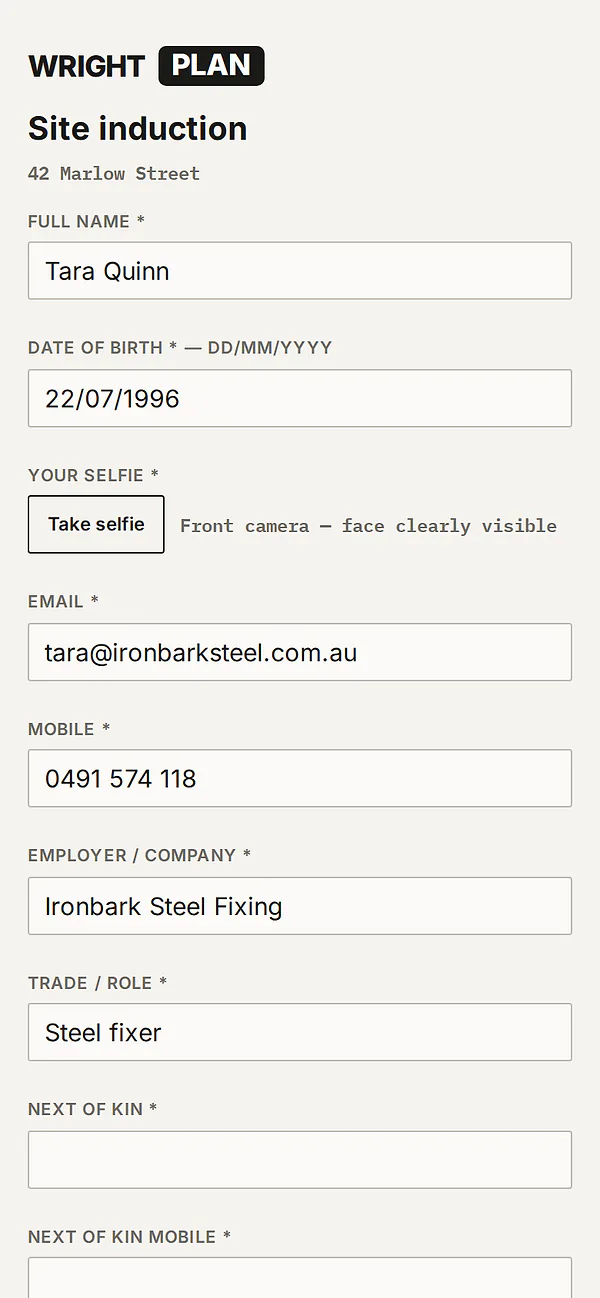
The site induction form on a phone for 42 Marlow Street, being filled in: full name, date of birth, a Take selfie button, email, mobile, employer and trade.
02 — REVIEW

Everything on one screen.

Approvers see the selfie, white card, tickets, which documents were opened and the signature. Accept, or decline with a note — they're emailed either way, and a declined worker fixes it from their email.

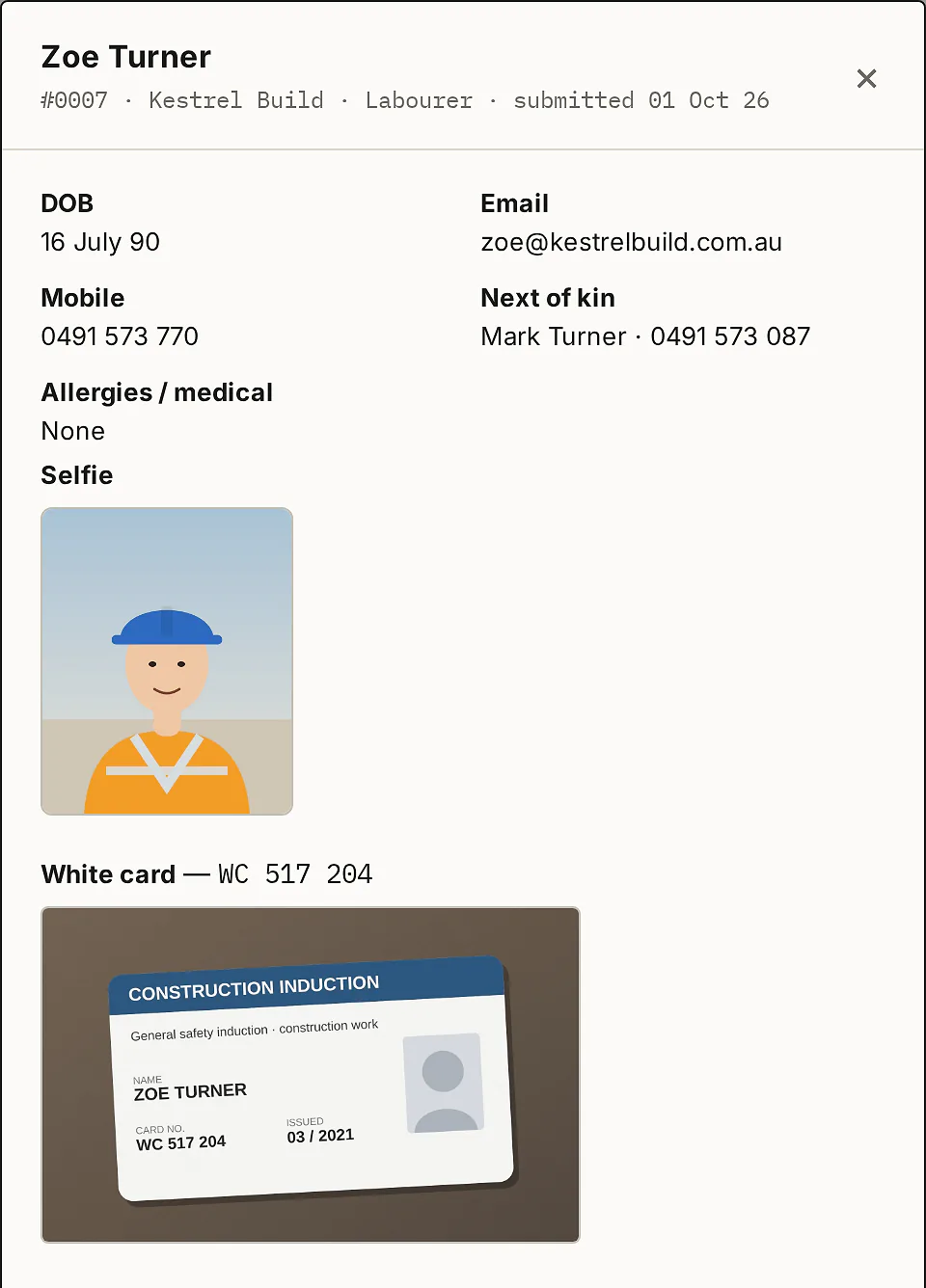
Zoe Turner's induction, number 0007, Kestrel Build, labourer: date of birth, email, mobile, next of kin, allergies, her selfie and a photo of her white card.
03 — REGISTER

A live, numbered register.

Every induction is numbered, searchable and filtered by status, refreshes on its own, and exports as an induction register PDF. Approvers, viewers and admins each get the access they need.

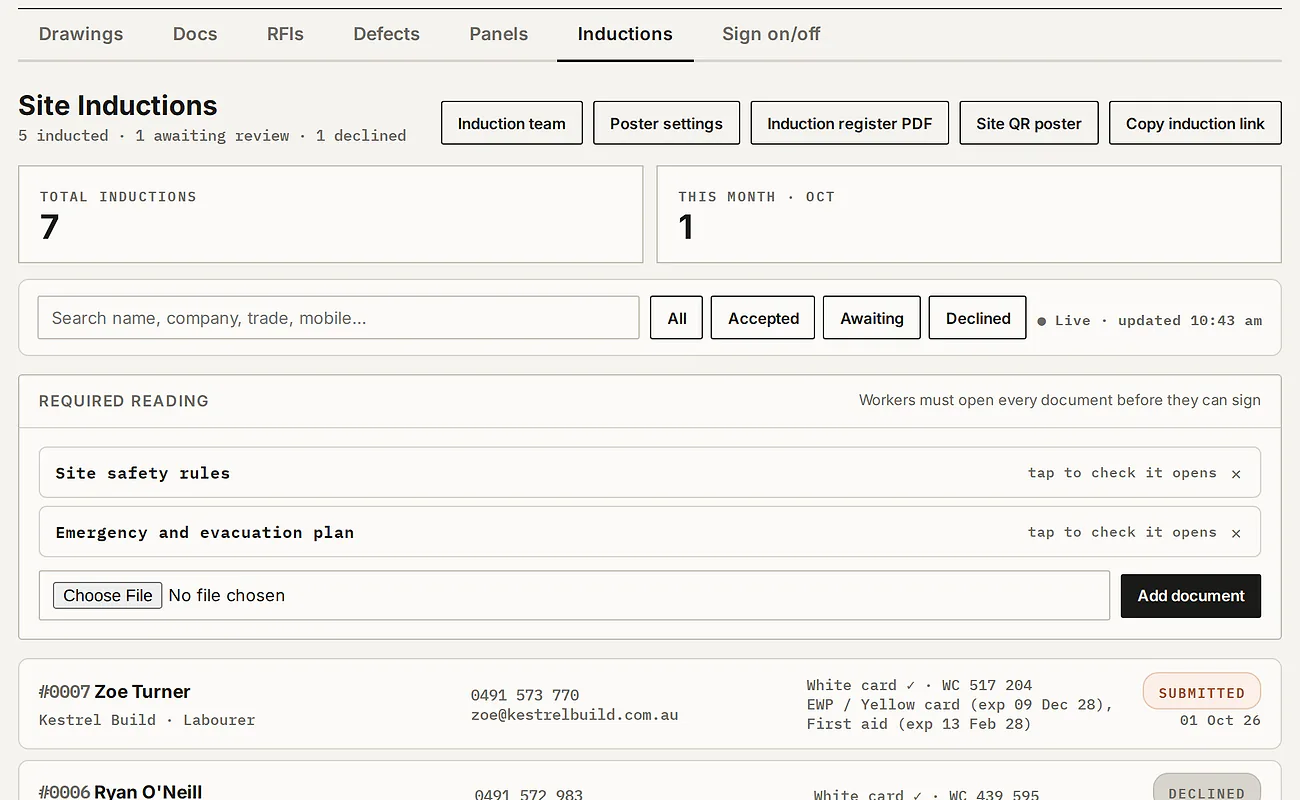
The Site Inductions tab: 5 inducted, 1 awaiting review, 1 declined; buttons for the induction team, poster settings, the induction register PDF, the site QR poster and the induction link; two required-reading documents; and the first induction, Zoe Turner, submitted.
Sign on/off · included with Inductions

Who's on site,
right now.

Accepted workers sign on and off from their own phone. Visitors sign in separately with their name, company, mobile and who they're visiting — and the register marks them as visitors.

01 — SIGN ON

One tap at the gate.

Accepted workers scan the gate poster and tap SIGN ON. Their phone is set up once — from their acceptance email or a code sent to their inbox. Forget to sign off? It closes at 12 hours, and they can trim the hours down.

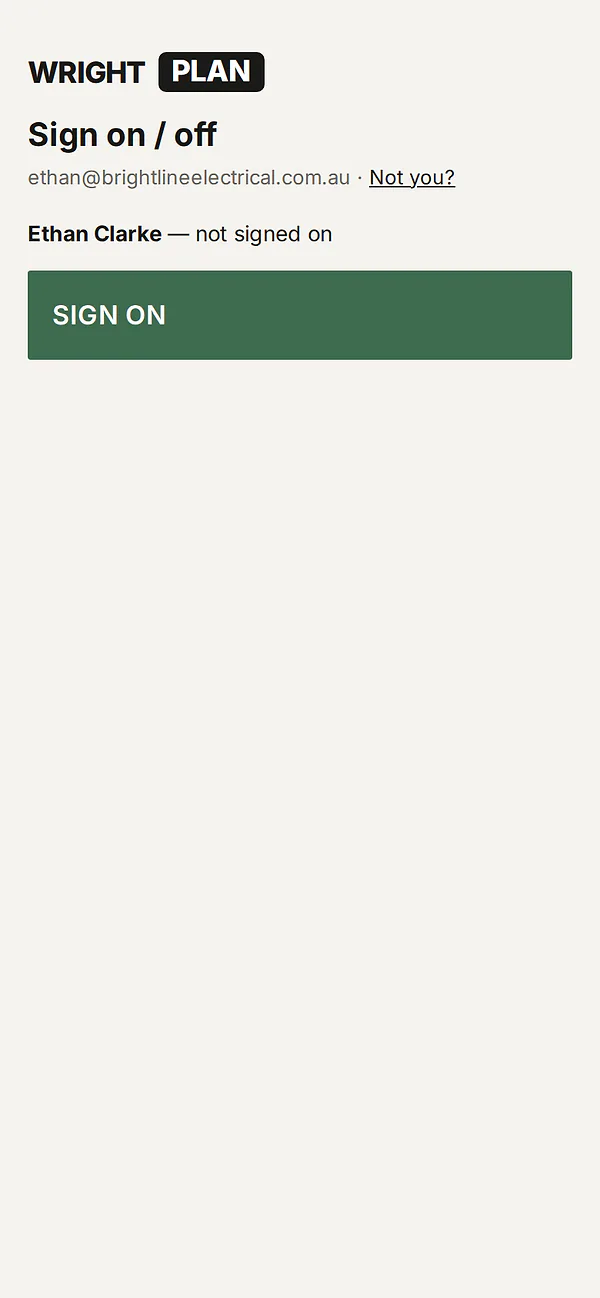
The sign on page on a worker's phone: Ethan Clarke, not signed on, and a large green SIGN ON button.
02 — VISITORS

Visitors sign in too.

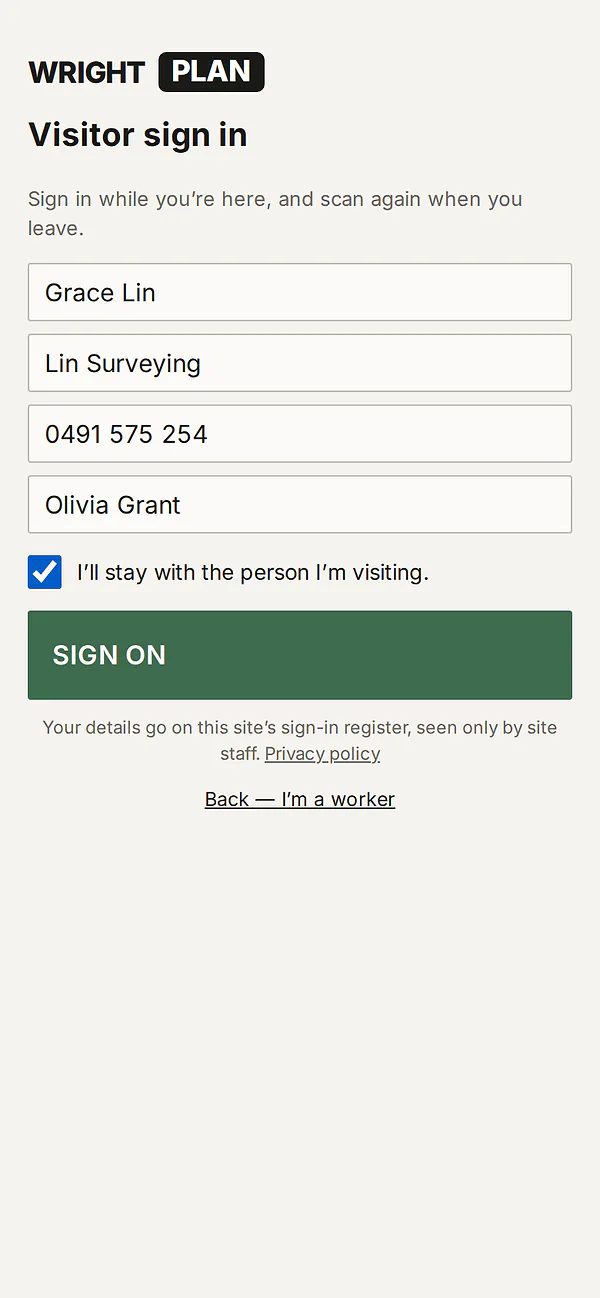
A visitor taps I'm a visitor, enters their name, company, mobile and who they're visiting, ticks that they'll stay with that person, and scans again when they leave. The office can also sign visitors in and out.

Visitor sign in on a phone: name Grace Lin, company Lin Surveying, a mobile number, visiting Olivia Grant, the tick I'll stay with the person I'm visiting, and a SIGN ON button.
03 — ON SITE

The office sees it live.

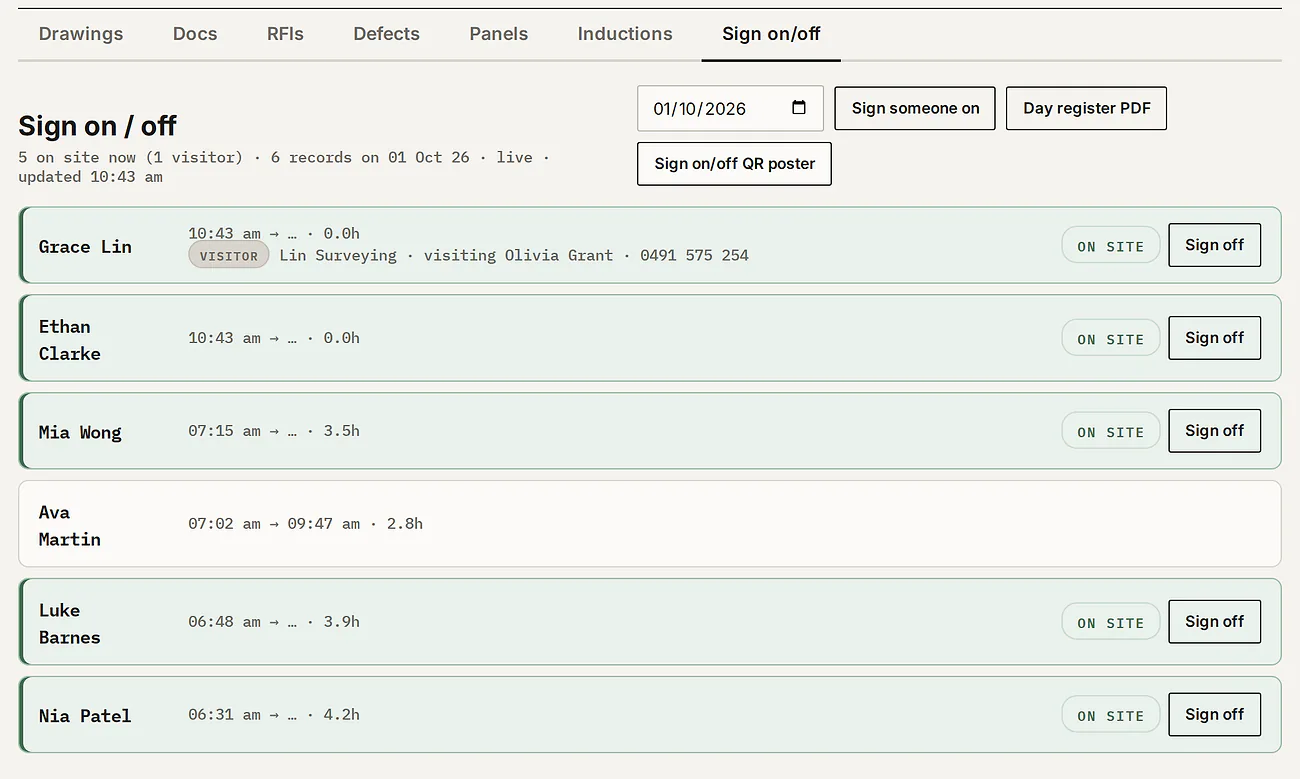
The on-site list refreshes on its own, shows hours per person and marks visitors, and the day's attendance register is one PDF.

The Sign on / off tab: 5 on site now including 1 visitor. Grace Lin is marked Visitor, from Lin Surveying, visiting Olivia Grant; Ethan Clarke, Mia Wong, Luke Barnes and Nia Patel are on site with their sign-on times and hours; Ava Martin signed off at 09:47.
Precast Panel Tracker · $550 a month inc GST

Every panel,
from pour to install.

QR sticker sheets for every panel. A scan shows its status, cure dates, QA docs and weight — crane crews and certifiers never need a login. $440 a month inc GST alongside Package 1 or 2.

01 — REGISTER

The register knows what's ready.

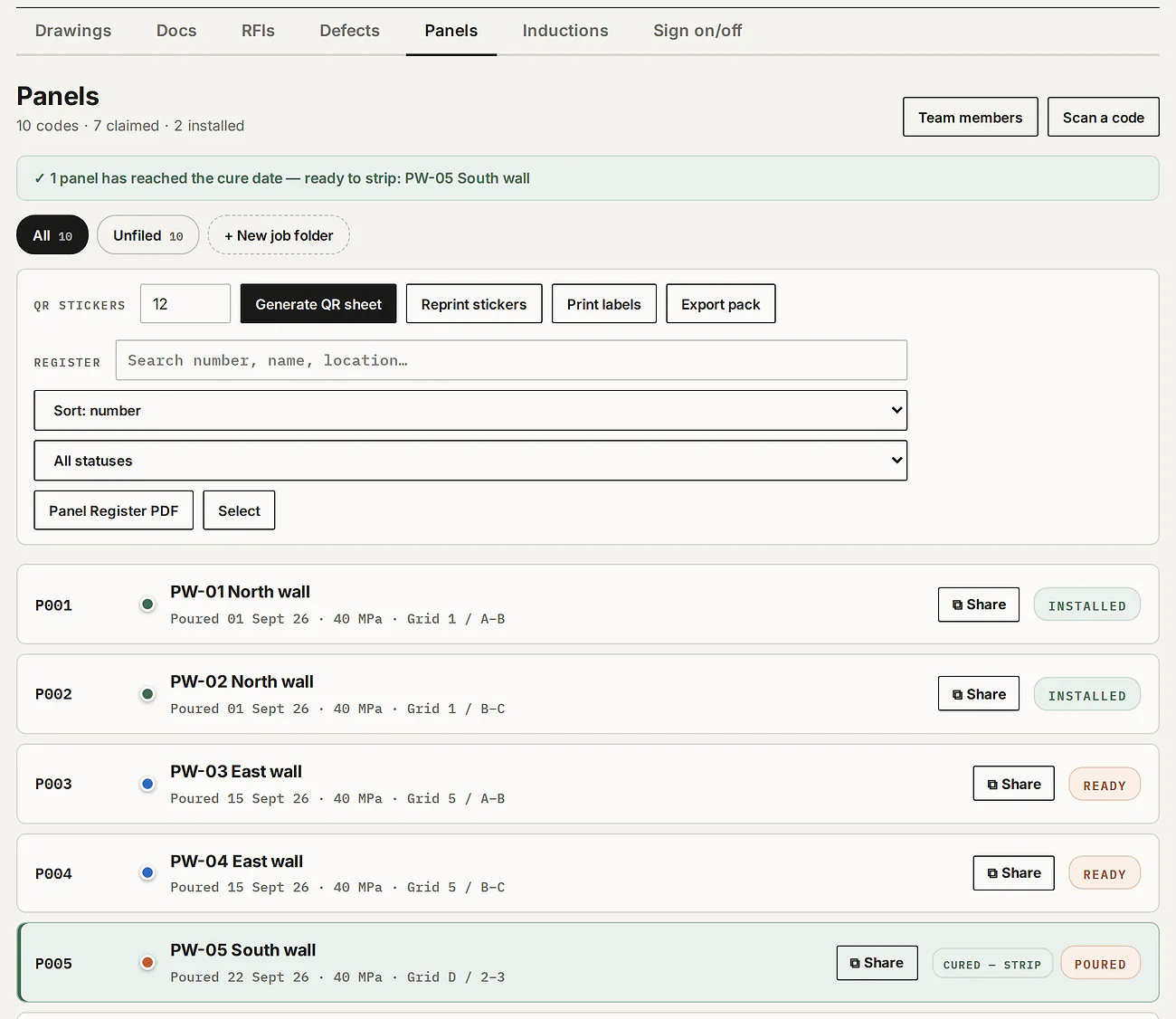
Each panel's status — poured, ready, installed — with its pour and cure dates, strength, weight and location, filed in job folders. When a panel reaches its cure date it's flagged ready to strip.

The Panels tab: 10 codes, 7 claimed, 2 installed; a green note that PW-05 South wall has reached its cure date and is ready to strip; the QR sticker and register tools; and panels PW-01 to PW-05 with their pour dates, strength, grid location and status.
02 — STICKERS

A sticker on every panel.

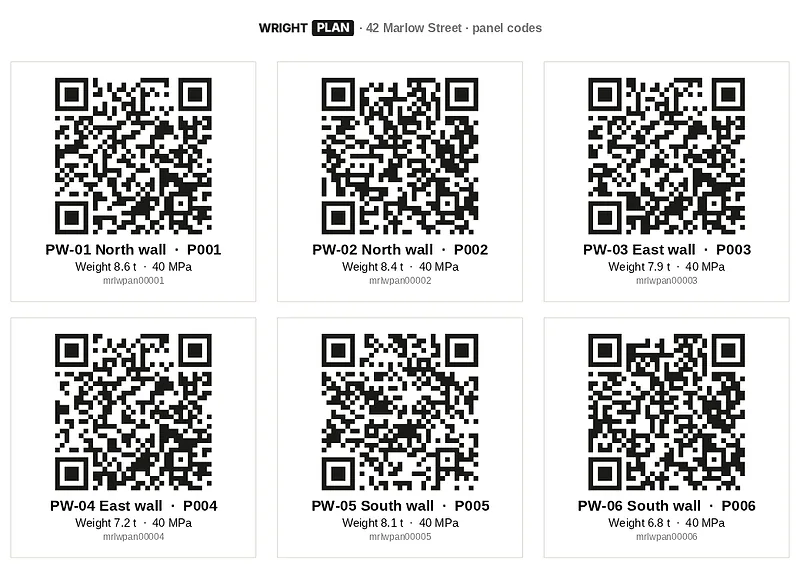
Generate a sheet of QR stickers, or print labels on an industrial label printer — Brady-style — with the panel mark, cast date, weight and QR.

A printed sheet of panel QR stickers: PW-01 to PW-06, each with its QR code, mark, weight and strength.
03 — SCAN

Scan it on the hook.

A phone camera opens the panel's record — no app and no login. Your panel team scans the same code signed in to update it.

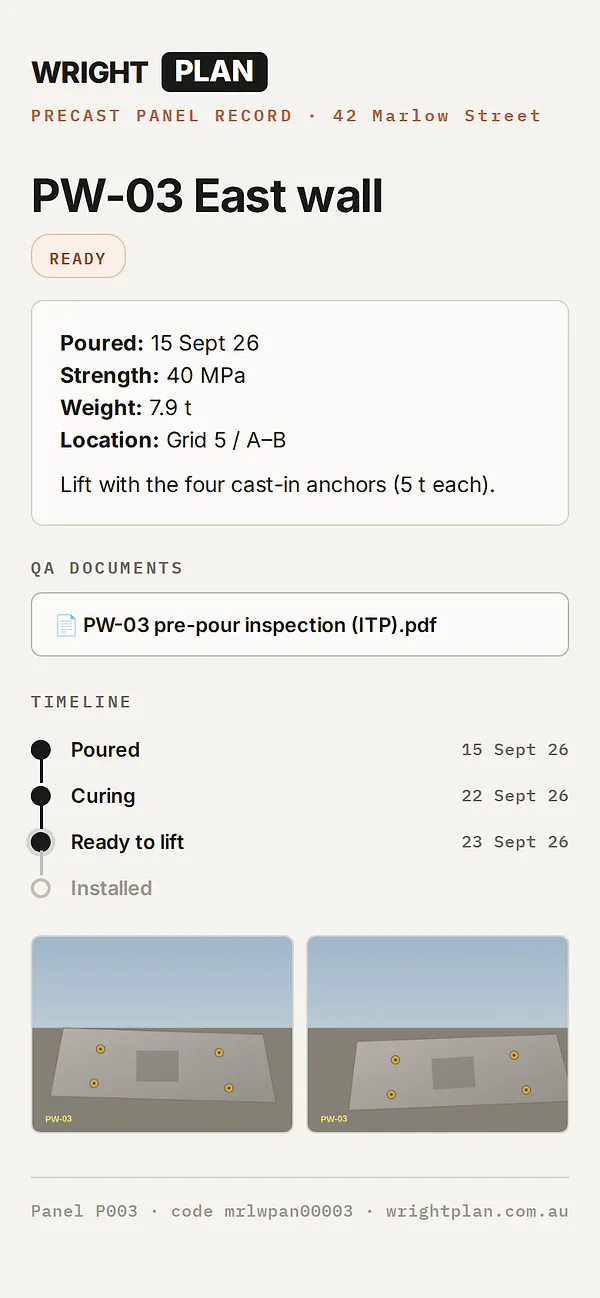
The panel record a scan opens on a phone: PW-03 East wall, Ready — poured date, 40 MPa, 7.9 tonnes, grid location, a lifting note, its QA document, the timeline from poured to ready to lift, and two photos.
Pricing

Three packages. Every price on this page.

One licence per project — distribute to unlimited subcontractors, team members and recipients at no extra cost. No hidden fees, no per-seat charges, no surprises.

Package 1 — Drawings + Docs

$275 /month · per project
inc GST
  • Numbers, titles and revisions read from the PDF's title block — you check them, it files
  • Branded revision emails with links — recipients never need an account
  • Old revisions marked superseded; see who has opened the current ones, by the email they entered
  • Recognised callouts jump between sheets, with a way back
  • Access-controlled links, a Docs folder for your team (2 GB included), Drawing Register PDF
  • RFI and Defect trackers $55/mo each; Docs storage to 100 GB $11/mo — inc GST
Start your project

Package 2 — Inductions

$165 /month · per project
inc GST
  • Site Inductions and Sign on/off — together
  • Selfie, white card number & photo, tickets, SWMS confirmed
  • Required reading opens in-page; accept unlocks only at the last page
  • Live numbered register, search & filters, induction register PDF
  • Approver, viewer and admin roles; one-tap accept or decline
  • One-tap sign on/off, 12 h auto sign-off, workers trim forgotten hours down; visitors sign in separately
  • Only $88/mo inc GST when added to Package 1
Start with Inductions

Package 3 — Precast Panels

$550 /month · per project
inc GST
  • QR sticker sheets — a scan opens the live panel record
  • Cure dates, ready-to-strip flags in the app, QA docs, weights in tonnes, job folders
  • Public scan page + per-panel share links — no login for viewers
  • Label printing for Brady-style industrial printers (mark · cast · weight · QR)
  • Panel admins run their own crew; signed-in scans open the claim form
  • Only $440/mo inc GST alongside Package 1 or 2
Start with Panels
A full builder job, added up
Add or drop any of these, any day.
Drawings + Docs$275
RFI Tracker$55
Defect Tracker$55
Inductions$88
=$473Total a month, inc GST

Wright Plan is a distribution service, not an archive — keep your own copies. Our terms & privacy say it plainly, including how induction photos are protected.

EVERY PRICE, IN FULL — AUD / MONTH / PROJECT, INC GST ON ITS OWN AS AN ADD-ON
Drawings + Docs — the base register$275—
RFI Tracker (needs Drawings + Docs)—$55
Defect Tracker (needs Drawings + Docs)—$55
Inductions + Sign on/off — one package$165$88 with Package 1
Precast Panel Tracker$550$440 with Package 1 or 2
Docs storage to 100 GB in total (2 GB included · needs Drawings + Docs)—$11

All prices are in Australian dollars and include GST.

That's the whole list. No setup fees, no per-user fees, no export fees — storage included, with extra space optional. If it isn't on this page, you'll never be charged for it.

FAQ

Fair questions.

Do recipients need an account?

No — they open the link, type their name and email once, and they're in.

Do drawings link to each other?

Yes, by themselves — a sheet number written on a drawing becomes a link when that sheet is in your register: section markers, detail callouts, “refer to” notes. It reads the PDF's text, so CAD exports work; a scanned drawing has no text to read, so it gets no links.

What happens if I stop paying?

Nothing goes dark on day one — your drawings stay viewable for a full week while you sort payment. After 7 days the project locks and drawings can't be seen; reactivate and access comes back. Wright Plan is a distribution service, not an archive: our terms allow superseded revisions to be removed and inactive projects to be closed, so keep your own copies.

Can I run Inductions or Panels without Drawings?

Yes — Inductions + Sign on/off ($165 a month) and the Precast Panel Tracker ($550 a month) each work on their own. The RFI and Defect trackers are add-ons to Drawings + Docs. All inc GST.

Do prices include GST?

Yes — every price on this page includes GST.

Put your register to work.

First project set up in minutes.

Open Wright Plan →